
The Change Logs feature in the Wicket Member Data Platform (MDP) provides administrators with a comprehensive view of data changes made within the system. This feature is currently in Beta and is available exclusively to administrator users.
Accessing Change Logs
To view the Change Logs:
Navigate to the account menu at the top-right corner of the platform.
Select "Change Logs" from the dropdown.
You will be directed to a dedicated Change Logs page that displays a detailed history of tracked data updates.
Understanding What’s Tracked in Change Logs
Each line item in the Change Logs represents a recorded update and includes:
When: Date/Time of the update
Name: The person or organization record affected
Action:
Create(new data added)Update(existing data changed)Destroy(data deleted)
Actor: the user who performed the action
Field Type: the general field that was changed
Each entry can be expanded to show more specific details:
Field (the specific fields that were affected)
Old value (before the update)
New value (after the update)
Filters and Search Options
To help refine and target your review of changes, the Change Logs page includes the following filtering tools:
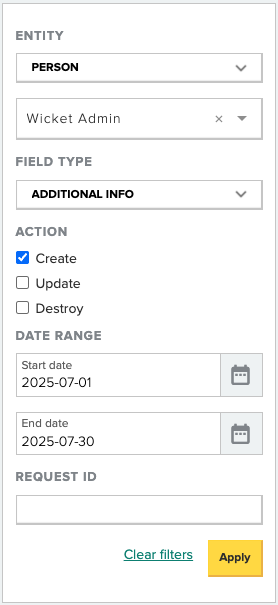 Entity Selector
Choose whether to view changes related to People or Organizations.
Entity Search
Search for a specific person or organization to display all updates related to that record.
Date Range Filter
Narrow results by selecting a custom date range for when the updates occurred.
Field Type
Apply filters for specific types of data fields. The following update categories are currently tracked and filterable:
Person (includes core profile fields, communication preferences)
Organization ((includes core profile fields)
Additional Information
Addresses
Emails
Phone Numbers
Website Addresses
Relationships
Group Administrators
Membership Assignments
Organization Memberships
To-Dos
Known Limitations
Not all data types or fields in MDP are currently tracked.
Changes to User Security Roles are not tracked.
Change to a person or organization Tags are captured as an entry, but do not include further details.
Exporting Change Logs is not currently available.
Comments
0 comments
Article is closed for comments.